Most small businesses do not have a contract-opportunity problem. They have a search-discipline problem. They open SAM.gov, type a broad keyword, skim a few notices, and assume the market is either huge or hopeless. Both conclusions are usually wrong.
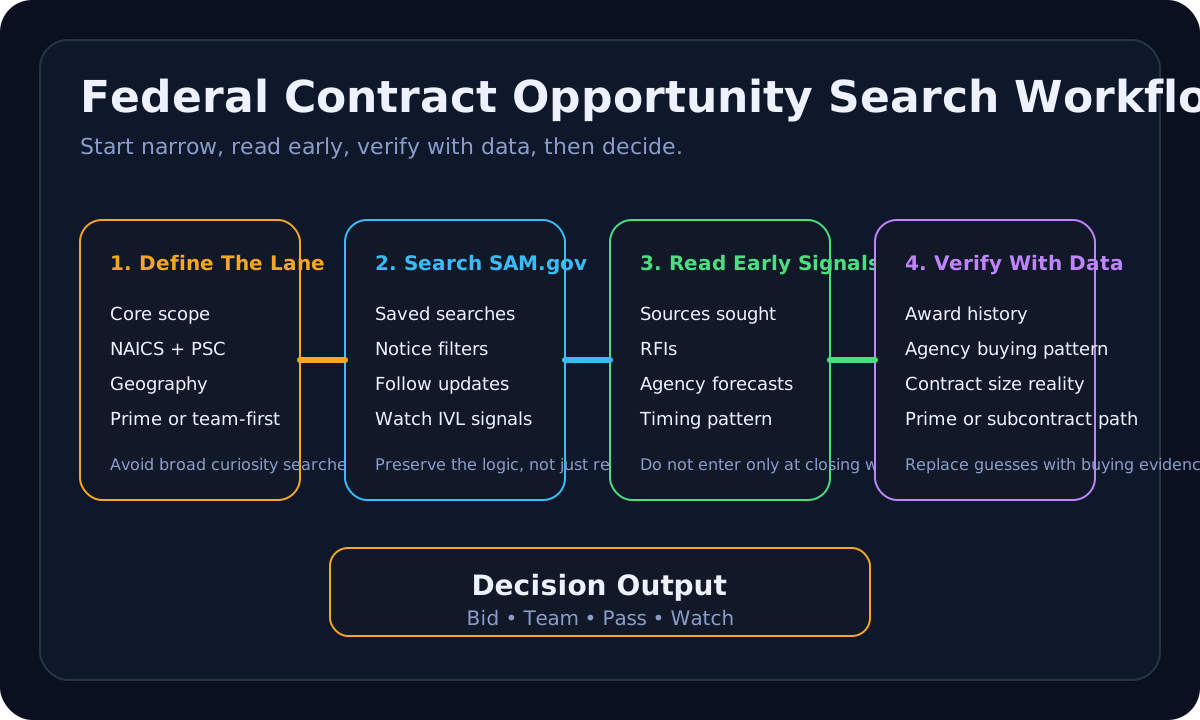
The better approach is to treat opportunity search as a repeatable workflow. You search for work that fits your lane, verify whether the buyer has a pattern of buying that work, watch the market early enough to see sources sought and forecast signals, and only then decide whether a notice deserves proposal time.
Start with the lane, not the keyword
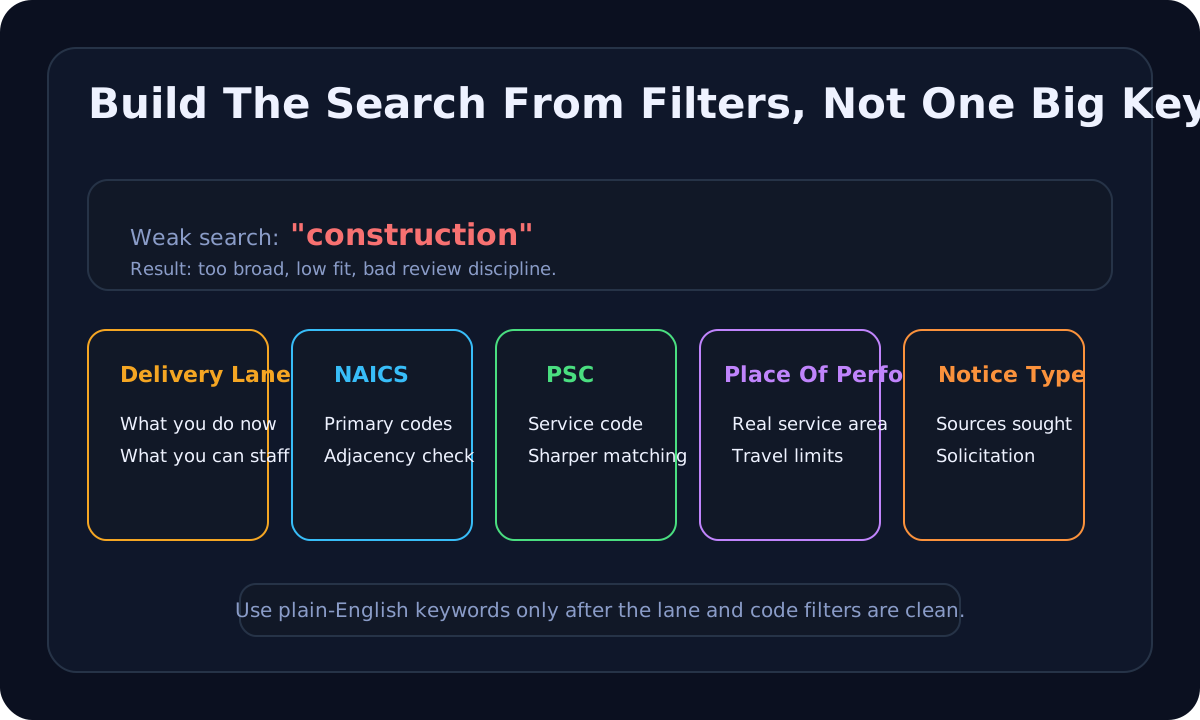
The first mistake is searching the way a curious browser would search instead of the way an operator should search. If you type construction, IT, or consulting into SAM.gov, you will create noise so broad that it hides the opportunities you could actually evaluate. That is not a market signal. It is a sorting failure.
A narrow lane usually has five pieces:
- Core scope. What you can deliver now without inventing new capability.
- Primary NAICS codes. The codes most likely to describe the work you already perform.
- Optional PSCs. Product and service codes that help narrow notice-level search on SAM.gov.
- Geography. Where you can realistically mobilize, staff, or service the work.
- Pursuit posture. Prime only, team-first, or subcontract-first.
SAM.gov's help guidance explicitly teaches users how to search by NAICS and PSC. That matters because a lot of small businesses still search only by plain-English keyword and then wonder why they miss relevant notices or drown in mismatches. Use the code structure first, then apply plain-English terms only where they sharpen the result set.
If you have not already cleaned up your lane definition, the faster move is to use the NAICS Code Lookup and the SAM.gov Search Plan Builder before you chase live notices. Search quality is usually fixed upstream.
SAM.gov is the search engine, but not the whole method
SAM.gov says anyone may search contract opportunities without an account, while a user account lets you save searches, follow changes to opportunities, and join interested vendor lists. That distinction is small on paper and important in practice.
If your team searches without an account every time, you are forcing yourself to rebuild the search repeatedly. You also lose the follow and interested-vendor-list behavior that helps you monitor notices after they shift. A small business should at least preserve its search logic, even if it is not yet bidding often.
The disciplined use of SAM.gov looks more like this:
- Use one saved search per delivery lane, not one giant search for the whole company.
- Pair NAICS and PSC filters when they improve specificity.
- Use place-of-performance and set-aside filters only when they match your real delivery constraints.
- Follow notices you may not bid today if they help you see how a buyer writes, amends, and scopes future work.
- Use the interested vendor list as a market signal, not as proof you should bid.
The last point matters. A long interested-vendor list does not mean a notice is unwinnable, but it does mean you should ask tougher questions about fit, differentiation, and the likely cost of preparing a response.
Read the early signals before the RFP scramble
The best search workflow is not only about posted solicitations. It also watches how agencies research the market before the final competition appears. FAR Part 10 says agencies conduct market research to arrive at the most suitable approach to acquiring supplies and services. That means the visible buying trail often starts before the final request for proposal lands.
FAR Part 5 and the sources-sought guidance around advance notices matter here because many small businesses arrive too late. They first notice the work when the response deadline is short, the incumbent already understands the customer, and their own questions are still basic. Search becomes much more useful when you watch sources sought, requests for information, and forecast items as part of the same lane.
SBA's federal contracting getting-started guidance also points businesses to agency procurement forecasts. That is one of the cleanest signals for search prioritization. A forecast is not a guarantee, but it helps you identify agencies that actually buy your scope rather than agencies you only assume are targets.
A practical watchlist has three layers:
- Forecast layer. Agencies that expect to buy your scope in the next cycle.
- Market-research layer. Sources sought and RFI notices that reveal how buyers are testing the market.
- Solicitation layer. Active opportunities that are close enough to your lane to deserve a decision.
This is how search shifts from random browsing to pipeline thinking. The goal is not to read every notice. The goal is to see the market early enough to decide where positioning effort belongs.
Use award history to stop guessing
Many teams search notices without ever checking whether the agency actually buys the work the way they think it does. That is how they end up misreading the size of the opportunity, the likely incumbents, and whether the better path is prime or subcontract.
SAM.gov's contracting domain and contract data tools make it clear that award data is part of the same ecosystem, and USAspending.gov describes itself as the official source for federal spending data. SBA's prime-and-subcontracting guidance goes even further by telling businesses to use SAM.gov and USAspending.gov for historical award information. That is the bridge between live opportunities and actual buying behavior.
Before you label a notice as high priority, check four things in award history:
- Agency pattern. Does this buyer purchase your type of work regularly or only rarely?
- Contract size. Are the historical award amounts consistent with your staffing and cash-flow reality?
- Incumbent shape. Are small businesses winning, or are large integrators dominating this lane?
- Acquisition path. Does the work appear as direct prime awards, schedule orders, or subcontract-heavy execution?
This step saves enormous time. It tells you whether the exciting notice in front of you is normal buyer behavior or an edge case. It also helps you see when a subcontracting move is the honest first path. SBA's subcontracting guidance points businesses to SUBNet and the directory of prime contractors with subcontracting plans for exactly that reason.
Decide with a search scorecard, not with adrenaline
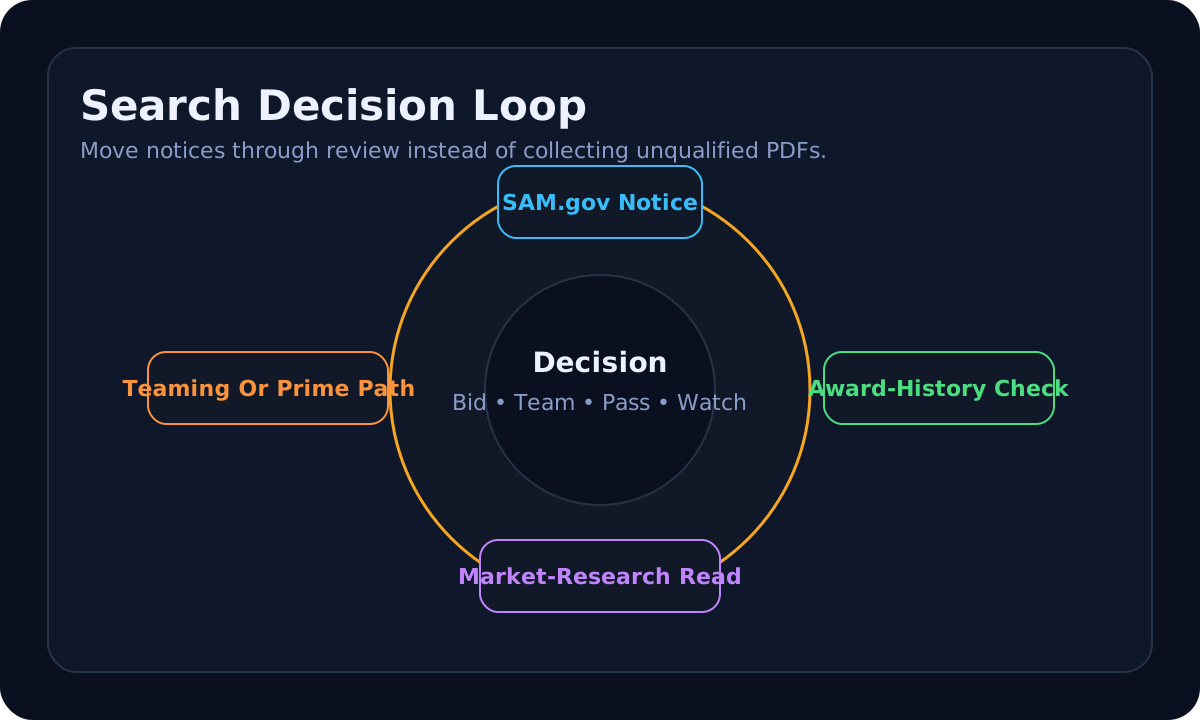
Search quality is only useful if it produces cleaner decisions. The real output is not a screenshot, a spreadsheet, or a folder full of PDFs. The output is a disposition: bid, team, pass, or watch.
A small-business search review should ask:
- Does the scope match the lane we defined?
- Do we understand the buyer's market-research pattern or are we entering late?
- Does award history suggest a realistic prime path?
- Would a team approach make this opportunity cleaner than forcing a weak prime bid?
- Are the notice type, timing, and compliance demands reasonable for us right now?
If those answers are weak, the right call is often pass or watch, not bid harder. That is why this workflow should connect directly to the Bid / No-Bid Scorecard and the Teaming Partner Fit Scorecard. Search without a disposition rule just produces more noise.
What this looks like for a small business in the real world
Imagine a small electrical contractor looking for federal work in Nevada and Northern California. A weak search would be something like electrical maintenance with no other structure. A stronger workflow would look like this:
- Define the actual lane: service, repair, minor projects, and facilities support rather than every electrical solicitation.
- Build a SAM.gov search around the relevant NAICS and PSC combinations plus geography.
- Save that search and follow notices that match the lane even if they are not immediate bids.
- Watch sources sought and forecast items from VA, GSA, Army Corps, and nearby civilian agencies that repeatedly buy facilities work.
- Check award history to see whether similar work is going to small businesses, incumbent regional primes, or schedule holders.
- Decide whether each notice is a prime opportunity, a teaming candidate, or a pass.
That process sounds slower than typing a keyword into the search bar. In reality it is faster because it avoids the downstream waste of reading dozens of bad-fit notices.
How Marcus should be used here
Marcus should not replace the source work. He should help structure it after you gather the facts. The useful prompts are operational and evidence-bound:
- "Turn this lane into a weekly SAM.gov search plan using NAICS, PSC, geography, and set-aside filters."
- "Review this sources sought notice and tell me if it fits our current staffing and past performance."
- "Compare this active notice against award history and tell me whether prime or team is more realistic."
- "Take these three notices and rank them as bid, team, pass, or watch with reasons."
That is a better use of decision support than asking for generic contract leads. Search still starts with the official systems. Decision support helps you turn the search output into a cleaner next step.
What to monitor after you build the workflow
Because the verified weekly Search Console exports referenced in the automation brief are unavailable in this checkout, there is no current page-level organic-performance evidence here to claim that this specific topic already has measured click-through or indexing momentum. That means this asset stays staged as an authority build, not a measured SEO win.
Once the release path is open and telemetry is recoverable, the right things to monitor are:
- Impressions and clicks for search-intent queries around federal contract opportunity search, SAM.gov workflow, and related long tails.
- Whether the page is indexed and whether clean-route canonicalization is preserved.
- Article-to-tool clicks into the Search Plan Builder and Bid / No-Bid Scorecard.
- Internal-link support from the broader Federal Contracting for Small Businesses guide, the SAM.gov search tips article, and the bid/no-bid article.
Until then, the honest status is simpler: the workflow is source-backed, locally validated, and staged only.
Bottom line
A strong federal contract opportunity search process is not about finding more notices. It is about finding fewer, better-qualified notices earlier. The business that defines one narrow lane, saves clean SAM.gov searches, watches sources sought and forecasts, checks award history, and then makes a disciplined bid/team/pass decision will usually waste far less time than the business chasing every new posting.
If you want the practical next step, tighten one lane first. Then build one saved search, one forecast watchlist, and one review rule for what becomes a bid. That is the workflow small businesses can actually sustain.